

Welcome back to the StoreLab newsletter!
This month, we’re excited to share a series of smaller (but equally impactful!) quality-of-life updates. Sometimes even minor adjustments can have the greatest effect, making your app easier to use, improving your workflow, and enhancing the experience for your customers.
These three updates come directly from your feedback, reflecting the things that matter most to merchants like yourselves.
In this release, we’ll walk you through what’s new, the problems these improvements solve, and how they can help you get more value from your app. Let’s jump right in!
Note: If you have any questions, don’t hesitate to contact your account manager or reach out to a member of our team. And if you’re new here, welcome! Find out more about growing your Shopify store with StoreLab by clicking here.
1. Collection List - Improved Image and Size Controls
%201.png)
What did we change and what’s the value?
We replaced fixed size dropdowns with flexible sliders giving you, as a merchant, far more precise and intuitive control over how collection cards and images are displayed across your storefront.
- Card size can now be adjusted using a smooth scale slider rather than fixed options, making it easier to refine the balance and spacing of your collection lists.
- Image scaling is now available when using the “Fit” feature, allowing you to reduce image size and control whitespace more effectively.
This update means you can adjust layouts with precision, create more polished and consistent app designs, and adapt your collection displays to suit different types of content. The result is a cleaner, more intentional storefront that looks and feels the way you want it to, without having to spend lots of unnecessary time on design workarounds.
What problem did this solve?
Previously, merchants found the existing image and card size options in the Collection List block too restrictive. Fixed dropdown sizes made it difficult to fine-tune layouts, and there was no easy way to adjust image scaling to account for whitespace or achieve the desired visual balance.
With the new and improved image & size controls, you can now customize layouts more precisely, balance visuals effectively, and create beautiful collection displays that match your branda aesthetic. Overall, this results in a more professional and cohesive app storefront design.
2. Loyalty Rewards - Clear & More Intuitive Experience
What did we change and what’s the value?
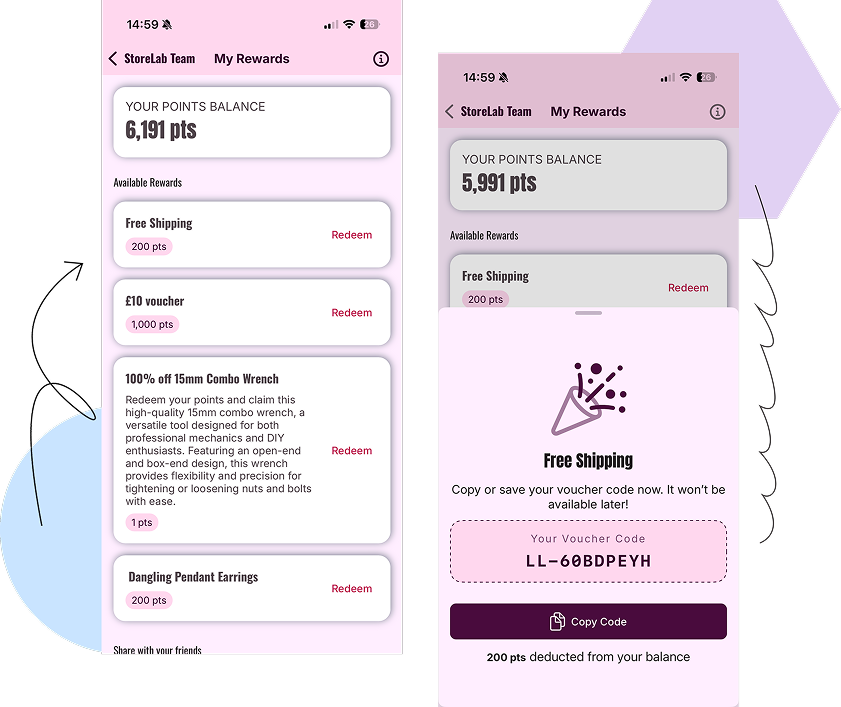
We’ve redesigned the in-app rewards experience to make it much clearer what customers can and cannot redeem, reducing confusion and giving them confidence.
- Rewards are now split into Available and Locked, based on the customer’s points balance.
- Rewards that cannot be claimed yet are greyed out, removing ambiguity.
- Clear confirmation steps make it obvious when points will be deducted.
- Coupon codes are now easier to copy, save, and use.
This creates a more transparent and user-friendly experience, helping customers track their progress, understand which rewards they can access, and feel confident engaging with loyalty programs.
For store owners, this redesign encourages stronger engagement and participation in loyalty programs, as customers can clearly see what they are working towards, stay motivated to earn points, and are more likely to redeem awards when they become available.
What problem did this solve?
The loyalty rewards page was not always clear for customers. It could be difficult to tell which rewards were actually available based on their points, and some users mistakenly assumed they could claim rewards they hadn’t yet unlocked.
This created confusion and a less intuitive experience when engaging with the in-app loyalty program. By enhancing the program with clearer and more exciting features, you’re more likely to gain a loyal customer base, see repeat purchases, and therefore, more sustainable Shopify revenue growth.
3. Wishlist - Variant-Level Saving
%201.png)
What did we change and what’s the value?
Wishlists now support saving specific variants, not just products, which is a huge step forward in UX (User Experience) for both you and your customers.
- Customers can save their exact size or color directly from the product page.
- Wishlist items now display variant details, similar to how they appear in the cart.
- Product listings still support quick product-level saving, while more detailed selection happens on the product page.
This creates a much smoother shopping experience, especially for apparel and other variant-heavy products. Customers can return to the exact item variants they want, reducing drop offs and increasing the likelihood of conversion.
For store owners, this provides deeper insights into customer intent and preferences, helping guide smarter merchandising and more meaningful, targeted engagement over time.
What problem did this solve?
Our team made it a priority to enhance this feature because before, customers could only save products to their wishlist, not specific variants such as size and color. This created friction when they returned to purchase, as not only did they have to reselect their preferred options, but sometimes those options were found to be unavailable.
For merchants, this also limited visibility into what customers were actually interested in at an SKU level. With this update, you and your customers both benefit from a more accessible shopping experience that supports smoother purchasing and merchandising.
What’s Next?
- Media Library Enhancement: We’re introducing a range of improvements to the Media Library to make managing and using your content smoother than ever.
- Predictive Search: We’re rolling out predictive search so customers can find products quicker with instant suggestions, even before they finish typing!
- Analytics Upgrade: We’re improving analytics to deliver more reliable insights and give you a clearer view of your app’s performance.
So keep an eye out for next month’s newsletter and for future announcements 👀
Before You Go
If you have any questions, feel free to reach out to your Account Manager, who can go into more detail or will connect you with the right team member.
Or if you’ve landed here looking for ways to grow your Shopify store, book a call with one of our friendly experts at StoreLab.

Skyrocket your Shopify sales with a no-code Apple & Android mobile app. Available now on the Shopify app store.







.webp)

