

Welcome back to the StoreLab Newsletter 👋
We’re back with another round of updates for your mobile app. Our team has been focused on making your app easier to customize, more reliable to manage, and better for customers to shop on. As always, we’ve been rolling out improvements based on your feedback and how you use StoreLab day to day.
In this February newsletter, we’ll walk you through what’s new, why it matters, and how these updates can help you get more value from your app.
This release includes key improvements to how you display collections and products, along with a few quality-of-life updates designed to make core workflows safer and more dependable.
Let’s jump in!
Note: If you have any questions, don’t hesitate to contact your account manager or reach out to a member of our team. And if you’re new here, welcome! Find out more about growing your Shopify store with StoreLab by clicking here.
Featured Collection and Product Recommendations - Major Design Upgrade
What is this feature upgrade/release?
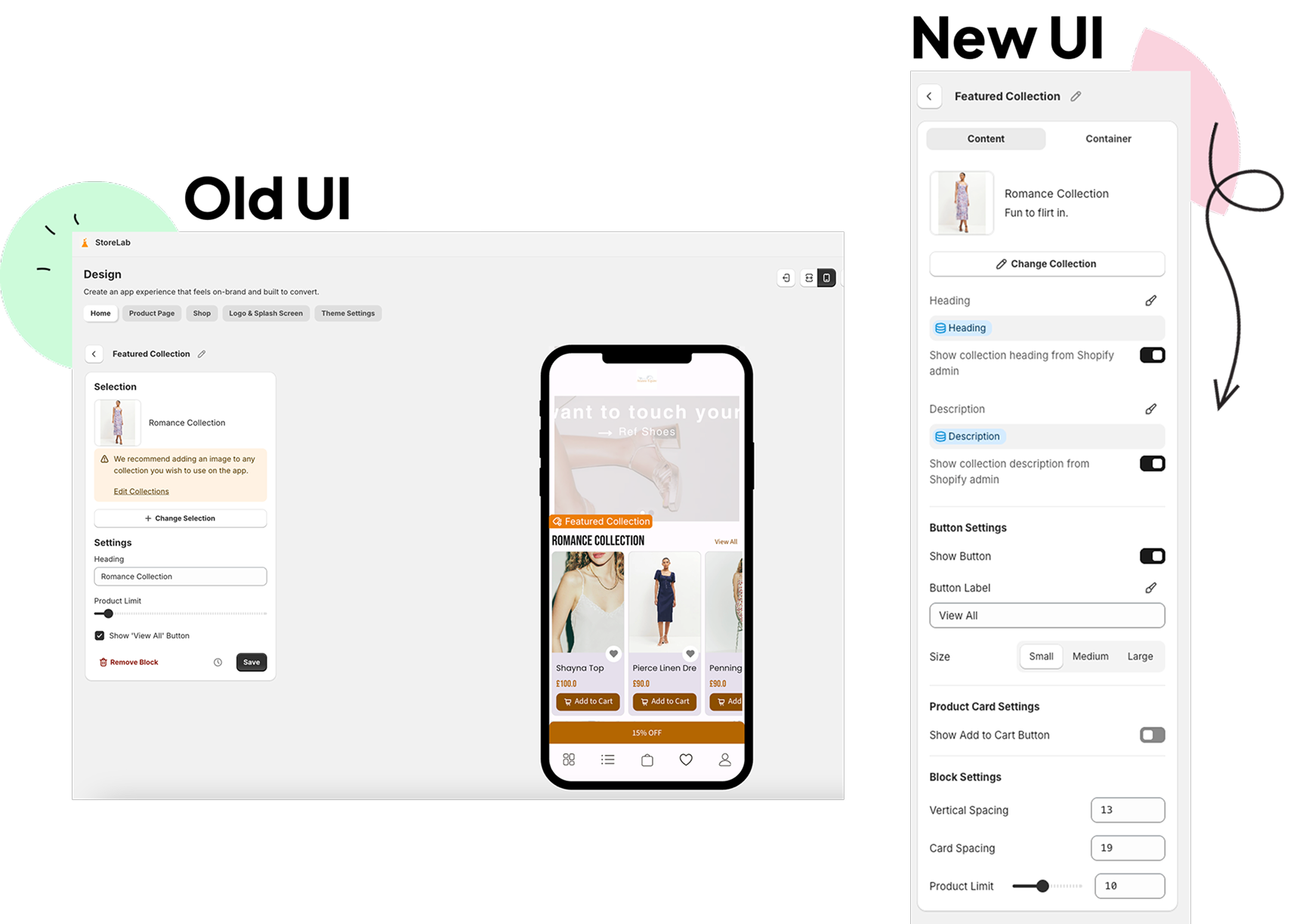
We’ve significantly enhanced the Featured Collection and Product Recommendations homepage blocks, giving you much greater control over how products are presented on your app homepage.
These blocks are your go-to tools for highlighting key products, whether from a specific collection or personalized recommendations tailored to your customers.
Before this update, merchants had limited options for controlling how these product cards looked and felt. Now, with the same powerful styling and layout controls already available across other homepage blocks, you can fully customize the appearance of these sections.
This means you can create visually consistent, on-brand product showcases that draw attention to your best items and make your homepage feel cohesive from top to bottom - giving customers a polished, professional, and smooth shopping experience every time they browse your app.
Why have we introduced this feature upgrade?
Featured Collection is one of the most widely used homepage blocks, but until now, it offered very limited customization. You could select a collection and adjust basic settings, but you couldn’t control spacing, styling, typography, or the overall presentation of your products.
This made it harder to maintain brand consistency, especially as other homepage blocks became more customizable. Many store owners asked for the ability to style these product showcases the same way they style the rest of their homepage.
With this release, Featured Collection and Product Recommendations are now fully aligned with the modern design system across StoreLab, providing you with the tools to create clean, cohesive, on-brand product displays that fit naturally into your app homepage.
.png)
What are the benefits of this release?
- Stronger brand consistency: Featured Collection and Product Recommendations can be styled to reflect your overall brand identity by matching typography, colors, and layout with the rest of your homepage.
- More control over product presentation: Adjust spacing, grid layouts, and container styling to create visually intentional, premium product displays that showcase your top offerings.
- Flexible messaging options: Sync collection titles and descriptions from Shopify or tailor them directly within your app to support promotions, campaigns, or merchandising strategies.
- Optimized conversion potential: Decide whether to show or hide add-to-cart buttons and experiment with layouts designed to support and encourage faster purchasing decisions.
- Unified design experience across blocks: These upgraded blocks now behave like the other modern homepage sections, making them easier to design, update, and maintain.
How does it work?
Featured Collection and Product Recommendations now include a complete set of layout and styling controls:
- Collection title and description: Sync automatically from Shopify or create your own custom text to suit campaigns, promotions, or editorial layouts.
- Button styling and control: Show or hide the “View All” button on Featured Collection blocks, and apply your predefined button styles and sizes for a consistent look.
- Add-to-cart visibility: Decide whether add-to-cart buttons appear on product cards to streamline the shopping experience.
- Flexible spacing: Adjust spacing between titles, descriptions, product cards, and individual products to create balanced, intentional layouts.
- Product limits: Display up to 25 products within the block.
- Full container styling: Apply background colors, borders, padding, and margins to match your app’s design system.
Product Recommendations includes the same visual and layout controls, so personalized product suggestions feel fully integrated with your homepage design.
All changes preview instantly and apply consistently across iOS, Android, and Web, so you’re providing an omnichannel experience for every shopper.
Where can I find this feature?
Web App Builder → Design Tab → Homepage Blocks → Featured Collection or Product Recommendations.
Any new blocks you add will automatically include the latest styling and layout options automatically.
.png)
Quality-of-Life Changes
Discover our smaller, but just as effective & important quality-of-life changes. Sometimes even the smallest adjustments create the greatest impact - enhancing usability and improving the experience for you clients and your customers.
Safer Push Notification Sending
.png)
What did we change & what’s the value?
We’ve introduced a confirmation step and a 10-second undo window when sending push notifications. After clicking send, you’ll be asked to confirm your action, and you can still cancel within a short window if needed.
This introduction gives you greater confidence when using push notifications, reducing the risk of mistakes and making the sending process feel safer, more controlled, and easier to manage.
What problem did this solve?
Previously, it was possible to accidentally send a push notification to your entire audience with no way to stop or correct the action. This caused understandable anxiety for merchants, especially when managing large subscriber lists.
With the new confirmation step and undo window, you now have a safer, more controlled process that reduces stress and prevents costly mistakes.
Improved Reliability for Restock Alert Subscriptions
.png)
What did we change and what’s the value?
We’ve made restock alert subscriptions completely reliable, so they register accurately every time and no customer sign-up is ever missed. Your customers can confidently sign up to be notified when products return, helping you capture more demand and bring interested shoppers back at the right moment.
This update ensures you don’t miss potential sales from customers who are actively waiting for products to come back in stock, making your restock alerts more effective and dependable.
What problem did this solve?
Some customers previously encountered errors when trying to subscribe to restock alerts using the Notify Me feature on out-of-stock products. This meant interested shoppers could miss notifications when products became available again, resulting in lost opportunities to capture demand.
With the improved reliability of restock alerts, every subscription now goes through successfully, helping you reach eager customers at the right moment, improve the customer experience, and recover potential sales.
%20(1).png)
What’s Next?
- Analytics Enhancements: We’re expanding our analytics to give you clearer visibility into performance and surface actionable insights, which means you can make more informed decisions and drive stronger Shopify growth.
- Abandoned Cart Workflow Controls: We’re introducing greater control over abandoned cart notifications, allowing you to optimise timing and messaging to recover more carts and increase conversions.
Before You Go
If you have any questions, feel free to reach out to your Account Manager, who can go into more detail or will connect you with the right team member.
Or if you’ve landed here looking for ways to grow your Shopify store, book a call with one of our friendly experts at StoreLab.

Skyrocket your Shopify sales with a no-code Apple & Android mobile app. Available now on the Shopify app store.







.webp)

