

Welcome back to the StoreLab newsletter!
This month, we’re doing something a little different 👀
For this December release, we’re highlighting our product team’s top picks for 2025: the top 3 features and enhancements we released for our app builder this year.
Now that Black Friday is behind us, we also want to celebrate some exciting wins in our Client BFCM Spotlight.
This year has been a year full of powerful upgrades, enhancements, and new releases, giving you the tools to create apps that are as unique as your brand.
Our team has worked hard throughout the year, and we want to share this recap to showcase their efforts, highlight the exciting new capabilities in our mobile app builder, and show the benefits they bring for both you and your customers.
Let’s jump right in…
1. Branding - A Complete Theme Settings Overhaul
What was this feature/release?
Earlier this year, we introduced a major update to Theme Settings with the launch of our new Branding system for the StoreLab mobile app builder.
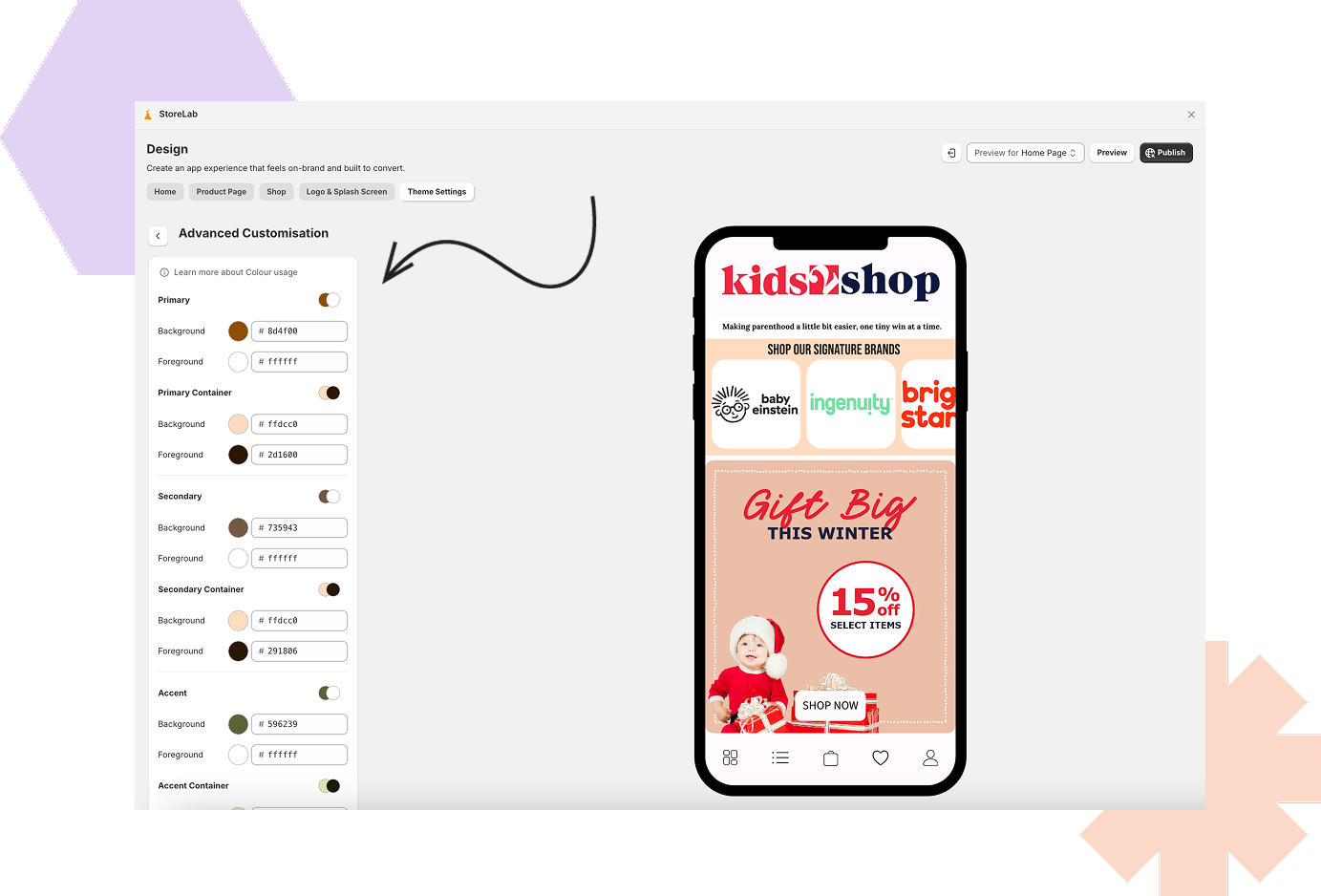
This overhaul gives you, as a merchant, a central place to define colors, buttons, typography, and navigation styles, and apply these brand choices consistently across your entire mobile app.
Rather than styling elements one by one, Branding lets you set your visual identity once and reuse it everywhere throughout the application.
Why did we introduce this update to Branding?
Creating a cohesive, on-brand app experience wasn’t already easy. Previously, theme customization in the StoreLab app builder was limited - color support was basic, button styles had to be managed manually, typography options were restricted, and navigation elements offered very little adaptability.
All of this made it harder to build and create truly branded apps or maintain a unified look and feel across platforms.
Therefore, many users told us they wanted deeper control, fewer workarounds, and a styling experience that felt familiar and aligned with Shopify.
Branding was built to deliver exactly that!
What are the benefits of this feature?
The upgraded Branding system brings a range of impactful benefits, giving you the ability to create an app that is both polished and beautifully designed.
Colors, buttons, typography, and navigation can now be defined once and applied automatically through the app for true brand consistency.
With over 20 color swatches, backgrounds, text, accents, navigation and important UI elements can all be customized in detail, so you have full control over the app’s overall appearance.
Updating designs is faster than ever; any changes you make to colors, buttons, fonts, or navigation styles are reflected instantly across your app, creating cleaner workflows, eliminating the need for repetitive styling, and reducing the risk of inconsistencies.
The system now works in a way that feels familiar for merchants already accustomed to Shopify’s theme and model, and Branding now looks and behaves the same across iOS, Android, and the web app render.
How does Branding work?
Branding brings multiple systems together inside Theme Settings:
- Colors: Choose from over 20 color slots that control key areas of your app. These colors can be reused across homepage blocks, navigation, and UI elements - update a color once, and every linked area updates automatically.
- Buttons: Create three reusable button styles (Primary, Secondary, and Text) and apply them anywhere buttons appear. Changes to a button style roll out instantly across the app.
- Typography: Define Body, Title, and Headline font styles and reuse them throughout your app to maintain clear hierarchy and brand tone.
- Navigation: Customise your app’s header and footer using your unique brand colors. Navigation styles can be linked directly to your Colors Settings, helping everything stay visually aligned.
All changes apply consistently across iOS, Android, and the web preview.
Where can I find this feature?
Web App Builder → Design → Theme Settings
2. Homepage Blocks - A Year of Powerful Enhancements
%201.png)
What were the homepage block enhancements?
From Rich Text and Image with Text, to Video, Slideshow, Featured Collection, Collection List, and Collection Grid, almost every one of our existing Homepage blocks has been upgraded to offer merchants far greater flexibility, customization, and control.
Why did we introduce homepage block enhancements?
Your homepage sets the tone for the entire app experience, and we know how important it is for you to make a strong first but also long-lasting impression.
Previously, many blocks were functional but limited, which made it harder to showcase brand identity, run campaigns, or refine & experiment with layouts over time.
Throughout the year, we’ve heard our merchants loud and clear. You consistently asked for:
- More design freedom without touching any code
- Better alignment and consistency between web, iOS, and Android
- Simpler & easier ways to create premium, on-brand storefronts
These enhancements directly addressed that feedback. They transform your homepage blocks from fixed components into flexible, easy-to-use tools, giving you the control to build sections that truly reflect your brand and encourage engagement.
What are the benefits of the homepage block enhancements?
One of the reasons we placed such a strong focus on enhancing Homepage Blocks this year is because we knew the impact and benefits they would have across key moments across both the user and customer journey.
The enhanced Homepage Blocks offer advanced no-code design freedom. Typography, spacing, sizing, layouts, backgrounds, and containers can all be controlled without relying on workarounds or support.
They also enable stronger brand expression. Homepages can be designed to genuinely reflect a brand’s identity - whether minimal, bold, editorial, or campaign-led.
With more flexible layouts and content options, your merchandising also becomes more effective. Collections, products, and key content can be highlighted in ways that guide discovery and help improve conversion.
Everything created in the Web App Builder is now consistently reflected across iOS and Android, ensuring a cohesive app experience on every platform.
And with all tools in one place, iteration is faster - making it easier to adapt your homepages for seasons, sales, launches, or editorial moments as needed.
How do these enhancements work?
Across all enhanced homepage blocks, you’ll find a shared set of powerful improvements (where relevant):
- Flexible layouts: Content can be structured in multiple ways, including stacked, overlaid, or spaced layouts to support your design goals and suit different preferences.
- Custom spacing & sizing: Padding, margins, card sizes, and gaps can be adjusted to create more breathing room or tighter, more compact layouts depending on your desired look and feel.
- Rich content controls: Headings, body text, and content presentation can be customized directly within each block, allowing greater control over hierarchy and readability.
- Block-specific options: Each block includes tailored settings where they matter most - such as hiding titles on collection blocks, adjusting content placement on media blocks, or refining layouts based on a block’s purpose.
- Container styling: Backgrounds, corner radii, borders, and padding can be applied at both block and item level for more polished and visually consistent designs.
- Consistency tools: Shared styling can be applied across multiple items to maintain cohesive layouts and reinforce brand identity.
- Live previewing: Changes are reflected instantly during setup, so iteration is fast and intuitive.
Where can I find these features?
You’ll find all enhanced homepage blocks exactly where you’d expect them to be:
Web App Builder → Design Tab → Homepage Blocks
Existing blocks will still be visible for now, but you’ll notice older versions are clearly marked as Deprecated. Whenever a new block is added, it will automatically use the latest version, unlocking all of the newest customisation options by default.
We strongly recommend switching over to the new versions as soon as possible! It’s the best way to take full advantage of the improved design controls, added flexibility, and more consistent cross-platform results.
3. Push Segmentation - Smarter, More Relevant Push Messaging
What is Push Segmentation?
Last but definitely not least, one of our favourite and most impactful releases in 2025 was Push Segmentation.
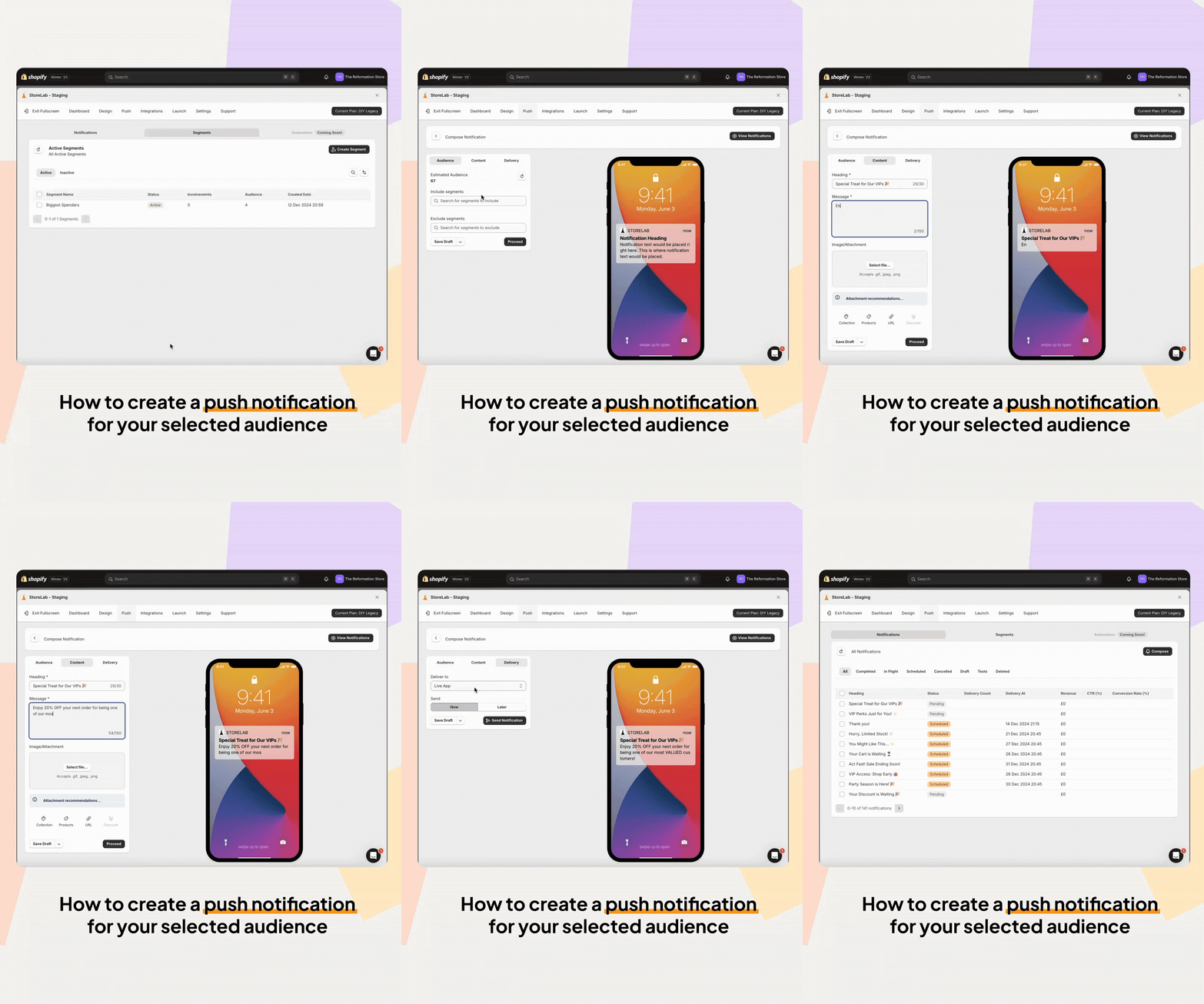
This feature allows you to send push notifications to specific groups of app users, rather than broadcasting every message to your entire audience.
You can now create reusable segments based on customer behavior and target push messages where they’ll be most relevant.
With Push Segmentation, push notifications are no longer a one-size-fits-all channel - they’ve become a powerful, personalized marketing channel that helps you reach the right customers at the right time.
Why did we introduce Push Segmentation?
As the StoreLab app builder grew, push notifications became a core part of how merchants engaged customers. But without segmentation, messages felt generic, performance suffered, and some end users felt overwhelmed by irrelevant notifications.
Store owners regularly compared push to channels like email, where targeting and personalization are expected. Without similar control, push felt limited - despite its potential to drive fast, high-intent engagement.
Push Segmentation was introduced to unlock that potential!
What are the benefits of Push Segmentation?
With Push Segmentation, you can send messages that resonate clearly with your audience. By targeting notifications based on customer behaviour, engaging improves leading to stronger click-through and conversion rates.
Customers receive fewer, but more meaningful messages, which builds trust and reduces opt-outs, while campaigns perform better because results are no longer diluted across a broad audience. This way, merchants also get much clearer insight into what’s working.
Segments can be saved and reused across multiple campaigns, creating reusable workflows that make managing push notifications more efficient. The system also provides a familiar experience for merchants, working in a way similar to email marketing platforms you already know and are comfortable using.
How does Push Segmentation work?
- You can now create saved segments using behavioral filters such as purchases, browsing activity, spend, and recency.
- Filters can be combined with simple AND / OR logic to build precise audiences.
- Segments can be previewed before sending and saved for future campaigns, supporting reusable workflows.
- When sending a push notification, you can choose All Users or select a saved segment for more targeted messaging.
- Push segmentation is privacy-friendly by design, requiring no collection or exposure of personal data.
The experience is designed to feel simple, intuitive, and fast (even for users new to segmentation!)
Where can I find this feature?
Web App Builder → Push → Segments
Client BFCM Spotlight 2025
To end the year nicely, we also want to celebrate some incredible BFCM results our clients saw across our Mobile App and Meta Ad services.
We put a big push on running Shopify Black Friday Cyber Monday campaigns for our clients because it’s one of the biggest sales opportunities of the year. Not only can store owners see immediate spikes in sales, but these efforts can also drive growth that lasts well beyond the Holiday season.
Here are some of the wins these brands achieved:
- Lunali Nail Supply (Mobile app): 370% increase in sales over the last 30 days compared to the previous period 💸
- Tush & Bush (Mobile app): 43% increase in sales over the last 30 days compared to the previous period 🚀
- Allura Superfoods (Meta ads): 100% increase in sales, 1000% increase in add-to-carts, and a 10x ROAS compared to the previous period 🤯
Mobile apps and Meta ads are powerful Shopify marketing channels on their own, but when used together, they can unlock even greater sales potential. If you’re looking to maximize results, talk to your Account Manager about expanding your services with our tailored, cohesive approach to mobile apps, Meta ads, and creative services.
What’s in store for 2026?
1. Lots of new product detail page customisations!
- Everything around customizing product pages
- A key part of the app-commerce journey that we’re especially excited to begin working on
2. Enhancements to the Media Library!
- A dedicated area for managing, selecting, and deleting images across your mobile apps
3. More analytics!
- We want our merchants to be as data-driven as possible
- We want to put the right tools in your hands to help you make the best decisions
“This year has been full of milestones for us, and I couldn’t be prouder of what the team has achieved. With strong momentum behind us, I’m really excited to head into next year with a sharp focus on evolving the product detail page and pushing the product even further.” - Hamza Sattar, Product Owner
Before you go
Happy holidays from our team at StoreLab to you and your family! However you’re spending this Holiday season, we hope it’s with love, joy, and laughter 🧡
If you have any questions about what we’ve covered in this newsletter, feel free to reach out to your Account Manager, who can go into more detail or will connect you with the right team member.
Or if you’ve landed here looking for ways to grow your Shopify store, book a call with one of our friendly experts at StoreLab.

Skyrocket your Shopify sales with a no-code Apple & Android mobile app. Available now on the Shopify app store.








.webp)

